
Switch Gym Software in 4–6 Weeks: Gym Owners Start With a Data Audit

Assign one person to own the migration, start a full data audit of members, billing, and attendance before you sign anything, and consolidate onto a single all-in-one platform to cut admin time and lift retention. Fitness Flow is one ready option built for that consolidation. The first move isn’t picking a vendor. It’s scheduling the data export and naming who’s accountable for the switch.
TL;DR:
- Conduct a comprehensive data audit, including member profiles, billing details, and attendance history, to prevent billing errors that typically cause migration failures.
- Run a test migration with a sample dataset to verify billing accuracy and profile integrity before executing the full switch, reducing the risk of member impact.
- Prioritize vendors that offer strong migration support, API connectivity, and clear contract terms, as support quality influences the success of a smooth transition.
- Plan for a parallel billing cycle during migration to catch payment issues early and establish a rollback plan if serious data problems emerge during go-live.
- Train staff using concise, role-specific quick-reference guides and communicate clearly with members throughout the migration timeline to ensure confidence and minimize confusion.
Getfitnessflow
Bring Gym Operations Together
Fitness Flow brings sales, scheduling, billing, analytics, and member engagement into one platform built for modern gyms.
Table of Contents
- How Do You Plan a Gym Software Migration Checklist?
- What Data Should You Audit Before Migrating?
- What Should You Look for When Evaluating a New Vendor?
- How Do You Run a Test Migration and Cutover Safely?
- How Do You Train Staff and Communicate Changes to Members?
- What Practitioners Get Wrong About Switching Gym Software
- If You Want a Partner for the Switch: How Fitness Flow Reduces Migration Risk
- Primary Resources and Checklist Links
- Sources
- FAQ
How Do You Plan a Gym Software Migration Checklist?
Most failed migrations aren’t vendor problems. They’re sequencing problems. Owners jump straight to demos before anyone has looked at what’s actually in their current system, and that’s how billing errors and angry members happen three weeks after go-live.
Here’s the order that actually works, based on the phase-based approach detailed in this step-by-step migration checklist:
- Planning — define why you’re switching (retention, admin hours, integrations) and set a target go-live date.
- Data audit — export and review every member, billing, and attendance record.
- Vendor evaluation — score candidates on migration support, not just features.
- Test migration — import a sample dataset and verify it before committing.
- Billing transition — run a parallel billing cycle to catch payment errors.
- Staff training — get front-desk and coaching staff comfortable before members touch anything.
- Go-live — cut over on a low-traffic day, ideally early in the week.
- Monitoring — watch payments, bookings, and support tickets for 7 to 14 days.
- Optimization — tune automations and messaging once the dust settles.
Assign an owner to each phase, not just the project overall. A single-location gym can usually move through this in four to six weeks. Multi-location operators should budget eight to twelve weeks, mostly because staff training and billing verification take longer across sites with different processors or membership structures.
What Data Should You Audit Before Migrating?
The data audit is where most migrations succeed or fail. Practitioners consistently point to messy legacy data as the single biggest driver of billing inaccuracies after a switch, and inaccuracies are what erode member trust fastest.
Before you touch a new platform, export and review:
- Member profiles, including contact info, emergency contacts, and custom fields
- Payment tokens and processor IDs tied to each active membership
- Membership types, billing cycles, and any grandfathered pricing
- Attendance and check-in history for at least the past 12 months
- Waivers and any compliance documents tied to member accounts
Cleaning that data means deduping accounts, flagging inactive members so you’re not paying to migrate dead records, and confirming every billing cycle date matches what members are actually being charged. Once you’ve cleaned the export, run a test import and spot-check a sample of profiles, reconcile attendance counts against your old system, and process a mock billing run to see whether totals match.
Pro Tip: Pull a printed or PDF snapshot of your last three billing cycles before you export anything. It’s the fastest way to catch a discrepancy after migration, because you’ll have a paper trail independent of either software system.
What Should You Look for When Evaluating a New Vendor?
Feature lists are the least useful part of vendor evaluation. What actually predicts a smooth switch is the support structure behind the software, and market evaluations of gym management platforms consistently point to onboarding quality and migration support as the factors that most reduce implementation risk.
Score any vendor you’re considering against these criteria:
- Migration support model — Do they offer assisted migration, a dedicated success manager, or migration SLAs with defined timelines?
- Integration and API depth — Will it connect to your existing payment processor, access control system, and scheduling partners without a rebuild?
- Payment token portability — Can member payment methods transfer without forcing everyone to re-enter card details?
- Contract terms — Is there a real trial or demo period, a clear exit clause, and a guarantee you can export your data if you leave?
Integrations tend to matter more than feature checklists here, because a platform that can’t talk to your existing payment processor creates weeks of manual work no matter how polished its dashboard looks.
How Do You Run a Test Migration and Cutover Safely?
A test migration isn’t optional. It’s the checkpoint that tells you whether your data audit actually worked, and it’s the last chance to catch a billing error before it hits a real member’s card.
- Import a sample dataset — pull 50 to 100 representative accounts, not your entire roster.
- Validate billing first — run a mock charge cycle and confirm totals, dates, and tax handling match your old system exactly.
- Check profiles and attendance — spot-check custom fields, membership tiers, and historical check-in data for accuracy.
- Choose your cutover strategy — a parallel run, where both systems operate side by side for one billing cycle, carries less risk than a big-bang cutover but takes longer. Big-bang works better for single-location gyms with simpler billing.
- Build a rollback plan — know exactly how you’d revert to your old system if go-live reveals a serious data problem within the first 48 hours.
Running a sample billing cycle during the test import catches the majority of billing edge cases before they ever reach a live member, according to guidance in the same migration checklist.
Once you’re live, monitor daily for 7 to 14 days: track failed payments, booking errors, app login issues, and support ticket volume. A spike in any of those in the first week usually points back to something the test migration missed.
How Do You Train Staff and Communicate Changes to Members?
Staff need functional competence fast, not a full manual. Build role-based quick-reference modules: front desk needs check-in and payment lookup, trainers need scheduling and class rosters, and managers need reporting and billing overrides. A short checklist per role beats a long training deck every time.
Member communication runs on a timeline:
- Two weeks before cutover — send a plain-language notice explaining what’s changing and why.
- Day of cutover — a short reminder with a direct link to the new app or portal.
- First two weeks after — proactive FAQ content and a visible support contact for billing questions.
Pro Tip: Give front-desk staff a one-line script for billing questions: “Your card on file transferred automatically, but if a charge looks off, we’ll fix it same-day.” That single sentence prevents most panic calls.
What Practitioners Get Wrong About Switching Gym Software
Owners obsess over comparing feature lists and underweight the data audit, and that’s backwards. Messy legacy data is what actually breaks migrations, not a missing dashboard widget. The gyms that switch cleanly are the ones that treat vendor onboarding support as a selection criterion, not an afterthought.
Fitness Flow customers report a 27% average increase in retention and 12 hours saved weekly on admin, numbers worth benchmarking against before any vendor call. Walk into that conversation with your billing cycles, member counts, and current admin hours already documented.
— Louis
If You Want a Partner for the Switch: How Fitness Flow Reduces Migration Risk
There are alternatives to running five disconnected tools for one gym. Rather than stitching together separate billing, scheduling, and member-engagement apps, some platforms consolidate these functions onto one platform with a branded member app built in, easing integration challenges.

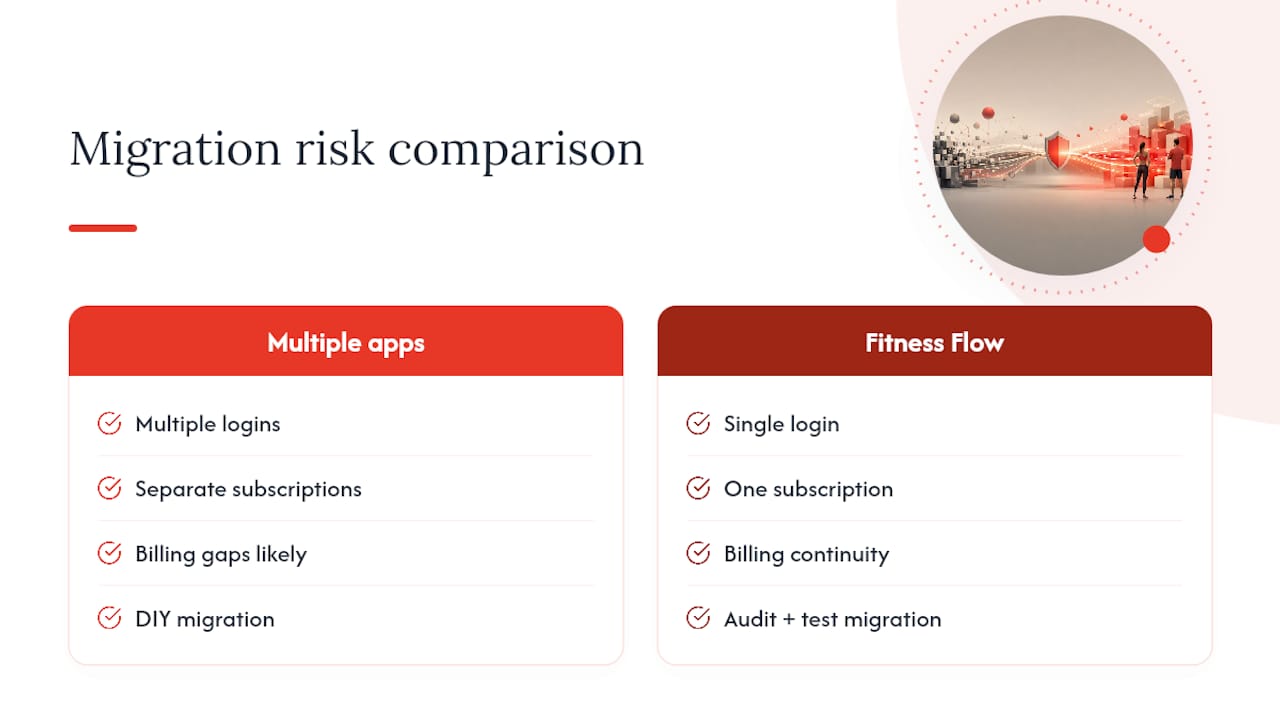
That consolidation is the core of what Fitness Flow is built to solve: one login instead of four subscriptions, billing continuity during the switch, and onboarding support to walk your team through the data audit and test migration rather than leaving you to figure out token portability alone. Retention gains compound further when your software switch is paired with visibility work like
If you’re already mapping your data audit and vendor criteria, book a demo of Fitness Flow and bring your current billing cycle details to the call.
Primary Resources and Checklist Links
For a granular, phase-by-phase walkthrough, see this gym software migration checklist. For a broader look at how platforms compare on onboarding and integrations, review this gym management software evaluation.
Sources
- Gym Software Migration Checklist 2026: Step-by-Step Guide
- My evaluation of the 8 best gym management software (2026)
FAQ
How Long Does Switching Gym Software Take?
A single-location gym typically completes the switch in four to six weeks; multi-location operators should plan for eight to twelve weeks due to more complex billing and staff training needs.
What’s the Biggest Risk When Changing Gym Management Systems?
Messy legacy data causing billing errors after go-live is the most common and most damaging risk, which is why a full data audit has to happen before vendor selection, not after.
Should I Run a Parallel Billing Cycle During Migration?
Yes, running one parallel billing cycle catches most payment errors before they reach members and gives you a safe rollback point if something goes wrong.
Does Fitness Flow Help With Data Migration?
Some gym management software offers onboarding support to help gyms consolidate existing tools, transfer billing and member data, and train staff before go-live.
What Should I Ask Vendors About Migration Support?
Ask whether they offer assisted migration, a dedicated success manager, defined migration timelines, and a guarantee that you can export your data if you decide to leave.