
3 Moves Busy Gym Owners Can Apply This Week to Fix Class Scheduling

Build your gym class scheduling around three moves: anchor recurring classes to your busiest real-world windows, set capacity by coaching and equipment limits instead of room size, and automate waitlists so empty spots fill themselves. Get those right, and you need clean member-facing schedule fields, a weekly review habit, and a system built to run all three without manual patchwork.
TL;DR:
- Most gyms achieve better results by anchoring recurring classes to actual peak attendance windows determined from recent data, not assumptions.
- Setting class capacity based on coaching and equipment limits, rather than room size, prevents overbooking and ensures quality instruction.
- Automated waitlists with a fixed cancellation window significantly improve fill rates and reduce last-minute no-shows, especially when using auto-add features.
- Regular weekly reviews of reservations versus attendance help identify demand issues or level mismatches before making permanent timetable changes.
- Clear, detailed member-facing schedules with real-time availability, level tags, instructor info, and policies boost booking confidence and reduce confusion.
Getfitnessflow
Simplify Your Gym Class Scheduling
Fitness Flow brings scheduling, member engagement, billing, and analytics together in one platform built for modern gyms.
Table of Contents
- Core Gym Class Scheduling Tactics That Move the Needle
- What Should Your Member-Facing Class Timetable Actually Show?
- How Do You Set Capacity and Test a New Timetable?
- Which Metrics Actually Prove Your Schedule Is Working?
- Why Integrated Scheduling and Analytics Change the Math
- How Getfitnessflow Runs This Playbook For You
- Sources
- FAQ
Core Gym Class Scheduling Tactics That Move the Needle
Most gyms build their timetable once and never touch it again. That’s the mistake. Gym schedule management works best as a living system you adjust weekly based on what members actually do, not what you assumed they’d do when you opened.
Here’s the sequence that works:
- Anchor recurring classes to proven peak windows. Pull attendance data from the last 60 to 90 days and find your real busy hours, not your guessed ones. Most gyms are surprised to learn their “peak” assumption (usually 6 AM and 6 PM) is only half the picture; a lot of studios see a second surge around lunch that nobody scheduled for.
- Label every class with format, level, and duration. “HIIT” tells a member nothing. “HIIT Circuit, Intermediate, 45 min” tells them everything they need to decide in three seconds.
- Set capacity by coaching load, not room square footage. A room might fit 30 mats, but if one coach can’t correct form for more than 18 people safely, 18 is your real number.
- Standardize buffer time between sessions. Ten to fifteen minutes minimum for equipment reset and safe turnover, longer for anything involving free weights or machines that need wiping and repositioning.
- Turn on waitlists with a locked cancellation window. Most platforms let you choose between “first to claim” (a text goes out, whoever responds first gets the spot) or “auto-add” (the next person in line gets slotted automatically). Waitlist automation changes outcomes depending on which one you pick, and auto-add fills faster but demands tighter payment reconciliation.
- Assign coaches directly in the schedule, and rotate junior staff through shadowing shifts. This protects class quality when your best instructor is out sick or on vacation.
Pro Tip: Run your first data pull on a Tuesday. Weekend attendance patterns skew the numbers and make Monday morning classes look emptier than they really are.
What Should Your Member-Facing Class Timetable Actually Show?
A confusing timetable costs you bookings before a member ever walks in. The fix is a short, consistent set of fields on every single class listing—no exceptions.
Your fitness class timetable needs to display:
- Class name and format (not a cute internal nickname only staff understand)
- Level tag: beginner, intermediate, advanced, or all levels
- Start and end time, written out in full (not just “7:00”)
- Instructor name
- Room or location, and a remote link if the class streams
- Spots remaining, updated in real time
- Waitlist status if the class is full
- Cancellation policy, especially the cutoff window
Clear level labeling matters more than most owners assume. ACE’s guidance on structured progressions points out that mixed-ability groups need level-appropriate programming to stay safe, and a member who walks into “Advanced Kettlebell” expecting a beginner flow is a member who doesn’t come back. The essential booking fields that ACE recommends exist for exactly this reason: they let a member book with confidence instead of guessing.
Offer both a grid view (week or day, for people who like to scan a whole schedule at once) and a list view (for someone who just wants “what’s on right now”). Members browse differently depending on whether they’re planning their week or standing in the lobby deciding what to do in the next ten minutes.
How Do You Set Capacity and Test a New Timetable?
Capacity is the number one thing owners get backwards. The room max is not your capacity ceiling. ACE’s small-group training guidance is blunt about this: when a class is technically full but the coach is stretched too thin to correct form, retention drops even though attendance looks strong on paper.
Follow this sequence when you’re setting or resetting a class slot:
- Determine the safe coaching ratio first. Ask your instructor, not your calculator, how many people they can genuinely coach well in that format.
- Set equipment flow as your secondary limiter. If a class needs 15 kettlebells and you own 12, that’s your real cap regardless of room size.
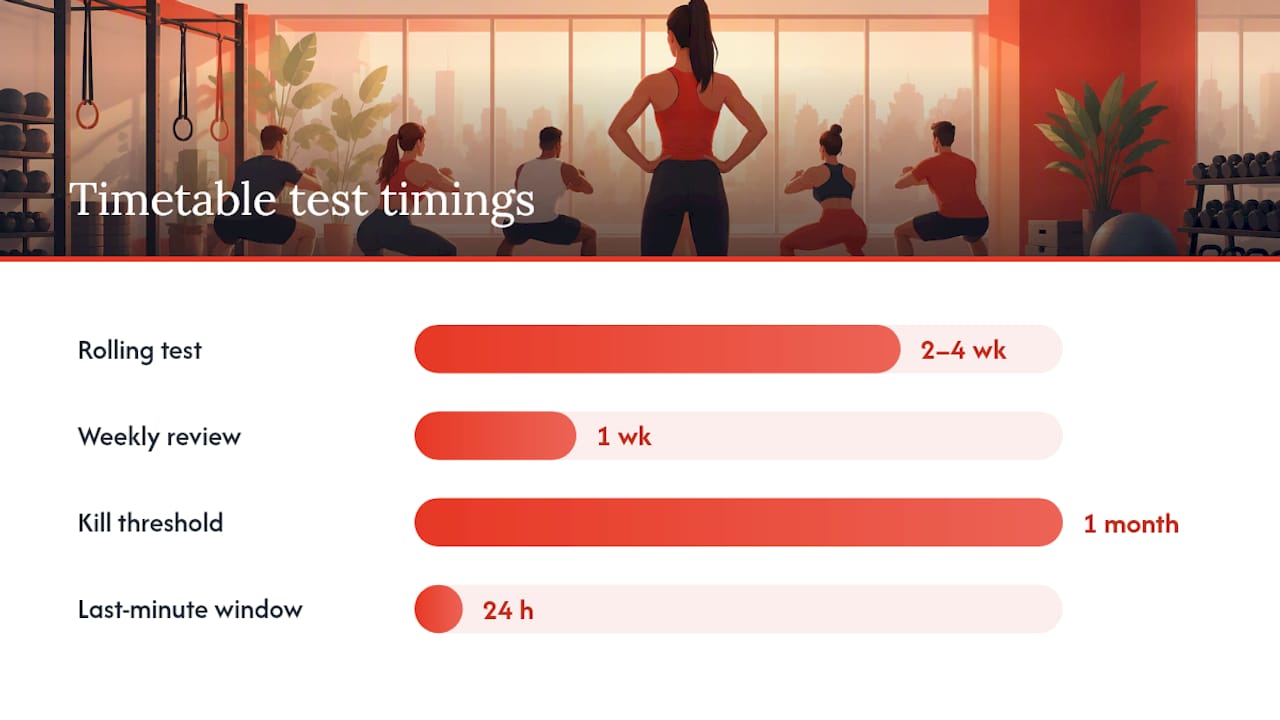
- Launch new slots as a rolling 2 to 4 week test, not a permanent addition. Treat it as an experiment with a defined end date.
- Run a weekly operational review, comparing reservations against actual attendance by class, coach, room, and even member segment (new members vs. long-tenured ones often behave very differently).
- Decide, don’t guess. If a test slot consistently books but doesn’t fill in the last 24 hours, that’s a timing problem, not a demand problem. If it never books at all, retire it.
Pro Tip: Give a new class exactly one full month before you kill it. Word of mouth inside a gym travels slower than owners expect, and week one attendance rarely predicts week four.
This cadence, a short weekly check paired with periodic timetable testing, beats the once-a-year overhaul most gyms default to. Small, frequent adjustments cause less member disruption than a total schedule reset every January.
Which Metrics Actually Prove Your Schedule Is Working?
Fill rate tells you if people are booking. Attendance rate tells you if they’re showing up. Those are two different problems, and confusing them is how gyms waste months fixing the wrong thing.
Track these five numbers weekly:
- Fill rate: reservations divided by total spots available
- Attendance rate: actual check-ins divided by reservations (not divided by capacity)
- No-show rate: reservations with zero check-in
- Waitlist conversion rate: how many waitlisted members actually get a released spot and show up
- Repeat attendance per member: how many times the same person books the same class type in 30 days
The retention stakes are real. The Health & Fitness Association’s 2026 report found 81 million Americans held fitness facility memberships in 2025, with facility usage at record levels. That volume means the gyms winning right now aren’t the ones with the most classes, they’re the ones whose classes actually match when members show up.
Read the signals correctly. High reservations paired with low attendance usually means booking friction (a confusing cancellation window) or a level mismatch, not lack of interest. High waitlist volume with low conversion often points to a cancellation window that’s too tight or payment authorization issues blocking auto-add. Whatever class correlates with your highest repeat attendance, protect that slot. Don’t move it, don’t shrink it, and don’t let a newer format bump it for room space.
Why Integrated Scheduling and Analytics Change the Math
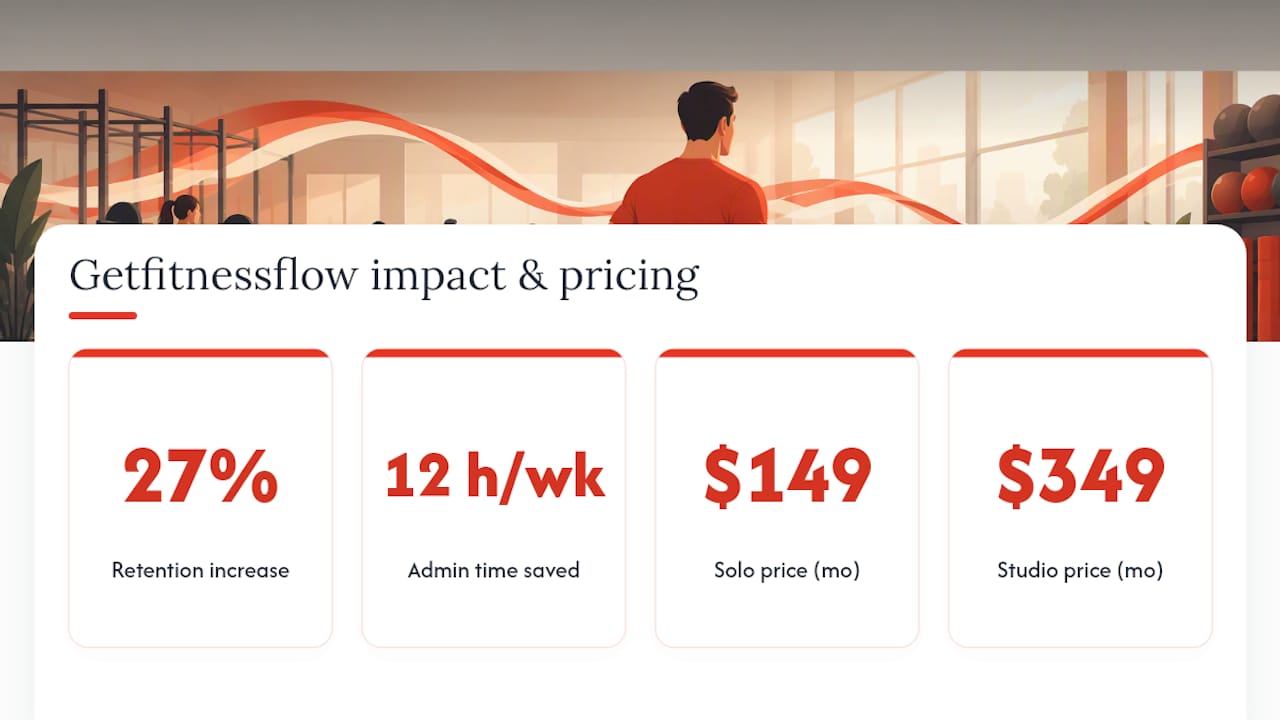
Gyms treating scheduling as a monthly chore instead of a weekly discipline consistently misread their own demand. With 81 million Americans now holding gym memberships, the operators pulling ahead are the ones reading attendance data instead of guessing at it. Getfitnessflow customers using integrated scheduling and analytics report a 27% average increase in member retention and save 12 hours a week on administrative work, numbers that back up what this playbook argues: the schedule is a retention lever, not a back-office task.
— Louis
How Getfitnessflow Runs This Playbook For You
Many gyms limp along with spreadsheet-plus-multiple-apps setups, but this approach can be replaced with a single branded system where scheduling, waitlists, capacity rules, and attendance analytics all live together instead of fighting each other across separate logins.

Every tactic in this playbook maps directly to a feature: recurring class templates anchored to your real peak windows, capacity controls set by coaching load instead of room math, automated waitlist fill rules, and a fully branded member app that keeps your schedule visible and bookable from a phone. Getfitnessflow customers report a 27% average increase in member retention and save roughly 12 hours a week that used to go into manual admin work. If your class visibility and booking flow could use the same kind of tightening a strong
Plans run from the Solo tier at $149 per month up to Studio at $349 per month, with Multi-site pricing available on request for gyms running more than one location. Book a demo at Getfitnessflow and see your own attendance data mapped against your current timetable before you change a single class slot.
Sources
Health & Fitness Association’s 2026 membership report; ACE’s small-group training guidance; Mindbody waitlist documentation; Gymdesk scheduling docs.
FAQ
What Is the Best Way to Start Gym Class Scheduling?
Pull your last 60 to 90 days of attendance data and anchor recurring classes to your proven peak windows rather than guessed ones. Set capacity by coaching load first, then layer in waitlist automation to catch overflow demand.
How Often Should I Review My Fitness Class Timetable?
Run a weekly operational review comparing reservations against actual attendance by class, coach, and room, then test new slots over a rolling 2 to 4 week window. This cadence catches problems faster than an annual overhaul and disrupts members far less.
How Do Waitlists Reduce No-Shows in Group Fitness Scheduling?
Waitlists with a locked cancellation window automatically fill canceled spots, either through a “first to claim” text alert or “auto-add” for the next person in line. Automation settings change results, so auto-add maximizes fill rate but needs tighter payment reconciliation.
What Should Gym Timetable Software Include?
Look for recurring class templates, drag-and-drop editing, grid and list views, instructor assignment, and waitlist automation at minimum. Getfitnessflow combines all of these with a branded member app and attendance analytics starting at $149 per month on the Solo plan.
How Do I Know if a Class Time Is Working?
Compare fill rate against attendance rate. If people book but don’t show, that usually signals a cancellation policy problem or a level mismatch rather than low demand, and it’s worth checking before you cut the slot entirely.