
Test 25–50 Records First: Gym Data Migration Plan for Gym Owners

The safest way to handle a gym data migration is to run a short pre-migration audit, choose assisted import if you carry billing tokens or heavy custom fields, and validate everything with a sample import before full cutover. Start today by assigning one internal migration owner and requesting a sample CSV template from your new vendor. Member records and billing continuity survive the move when you test before you trust.
TL;DR:
- Moving billing tokens securely depends on verifying vendor support for token portability and conducting live test charges before full switch-over.
- Assisted or concierge migration options are safer for gyms with complex custom fields or multiple integrations, despite higher costs and longer timelines.
- Testing 25 to 50 sample records during mapping helps identify errors early, preventing member account issues and revenue loss during billing cycles.
- Clear communication with members before, during, and after the migration reduces support tickets and maintains billing and access continuity.
- A structured four-phase process applying detailed planning, cleanup, testing, and validation minimizes risks like duplicate billing or locked-out members.
Getfitnessflow
Plan Your Gym Data Migration
Fitness Flow brings scheduling, billing, member engagement, and analytics together in one platform for modern gym operations.
Table of Contents
- What Records Actually Need to Move During Gym Software Migration
- Self-Service, Assisted, or Concierge: Which Migration Fits Your Gym?
- The Four-Phase Gym Data Migration Checklist
- Keeping Recurring Billing Alive Through the Transition
- How to Validate a Migration Before You Trust It
- Telling Members What’s Changing (and When)
- How Fitness Flow Supports a Smooth Migration
- Why Most Migration Advice Skips the Part That Actually Breaks
- Get Migration Help or Book a Demo With Fitness Flow
- Sources
- FAQ
What Records Actually Need to Move During Gym Software Migration
Not every field in your old system deserves a seat on the new platform. A clean gym data migration separates what must transfer from what can simply be archived.
Core records almost always make the trip:
- Member profiles (names, contact info, emergency contacts, photos)
- Active memberships and contract terms
- Billing tokens and payment history
- Access control credentials and key fob or code assignments
- Attendance and check-in logs
- Class schedules, rosters, and staff assignments
- Waivers and signed agreements
- Custom fields (goals, medical notes, referral sources)
Optional history is a judgment call. Deep workout logs and device-synced metrics from wearables often live in Apple Health, Google Fit, or third-party trackers rather than your gym management system, and moving them cleanly depends on write-back permissions those platforms control. Google’s own documentation on connected apps shows how limited some of that access really is.
Ask vendors for exports in CSV or JSON for member and billing data, and GPX or FIT for anything GPS or workout-related, since those formats carry the least data loss between systems.
Self-Service, Assisted, or Concierge: Which Migration Fits Your Gym?
Every gym management system migration falls into one of three tiers, and picking the wrong one is where most headaches start.
Self-service means you or your staff run the import tools yourself, usually through a CSV upload wizard. It is the cheapest and fastest option, but it puts the burden of accurate field mapping entirely on you.
Assisted migration brings in a vendor specialist to help map fields and troubleshoot edge cases, while you still do the data prep. It is the middle ground most gyms with more than a few hundred members end up choosing.
Concierge migration hands the entire process to the vendor’s team, from export to validation. It costs more and takes longer to schedule, but it is close to hands off for you.
- Self-service: fastest start, lowest cost, higher risk of mapping errors
- Assisted: moderate cost, faster resolution of custom-field problems, recommended once billing tokens are involved
- Concierge: highest cost, longest lead time, best for multi-location gyms with complex integrations
If your gym stores payment tokens tied to a specific processor, or you rely on a dozen custom fields for medical waivers and referral tracking, assisted or concierge is the safer call. Some vendors now market AI-assisted field mapping that promises faster imports. It genuinely speeds up the first pass, but accuracy still depends on a human reviewing the mapped fields before go-live, not the algorithm alone.
The Four-Phase Gym Data Migration Checklist
A structured migration process breaks cleanly into four phases, and skipping any one of them is how gyms end up with duplicate billing or locked-out members on day one.
Phase 1: Pre-migration planning
- Inventory every data source: your current gym management system, spreadsheets, payment processor, and any standalone booking or access control tools.
- Assign one internal migration owner who has authority to make final calls on data decisions.
- List every integration that must survive the move (payment gateway, door access, email marketing).
- Identify your must-have fields versus nice-to-have fields.
Phase 2: Data audit and cleanup
- Remove duplicate member records before export, not after.
- Standardize phone number and email formats so the new system’s validation doesn’t reject rows.
- Flag inactive or canceled accounts so they don’t get billed again.
- Document what each custom field actually means, since “Field 12” won’t mean anything to your new vendor’s support team.
Phase 3: Migration and mapping
Prepare your CSVs using the vendor’s template, map each field explicitly rather than relying on auto-matching, and run a sample import first. Confirm whether payment tokens transfer directly with your processor or require member re-authorization.
Phase 4: Post-migration validation
Spot-check a random sample of imported records against the original data, run a live billing test on a handful of accounts, verify class booking and access control both work end to end, and train front-desk staff on the new interface before members show up. Keep a documented rollback plan in case something breaks.
Pro Tip: Schedule your go-live for a Tuesday or Wednesday morning, never a Monday or a day before a big class push. Keep support staffed for 7 to 14 days after cutover so small issues get caught before they become member complaints.
Keeping Recurring Billing Alive Through the Transition
Billing continuity is where most gym software migrations either succeed quietly or fail loudly. The choice between tokenization and re-collection decides which outcome you get.
Tokenization lets your new platform accept the existing payment token from your processor, so members never re-enter a card number. It preserves PCI compliance because raw card data never touches your systems directly, and it avoids a wave of failed payments from expired or mistyped cards. Re-collection, where members re-enter payment info manually, is simpler for the vendor but risks a real drop in successful charges if members ignore the request.
- Ask vendors directly whether their processor supports token portability from your current gateway.
- Run a live test charge on a handful of real (or sandbox) accounts before the full switch.
- Build a specific test for failed payment workflows, since retry logic differs by platform.
- Plan for how refunds, prorated charges, and billing disputes from the transition period get resolved, ideally documented in writing before go-live so front-desk staff aren’t guessing.
How to Validate a Migration Before You Trust It
Testing is the difference between a migration that goes smoothly and one that generates angry calls in week one.
For each one, verify the membership tier, billing date, payment method status, and any custom fields tied to compliance or medical notes.
- Confirm check-in and access control work for a test group before opening to all members.
- Track failed payments, check-in errors, and booking failures daily for the first two weeks.
- Set a clear rollback trigger, such as more than 5% of test transactions failing, that pauses go-live automatically.
Industry guidance recommends staffing support heavily during the first 7 to 14 days after cutover, since that window is when mapping errors and edge cases surface. Waiting longer than two weeks to catch a systemic issue usually means it has already affected a full billing cycle.
Telling Members What’s Changing (and When)
Members notice change fast, especially anything touching their credit card. Clear, timed communication prevents most of the support tickets a migration otherwise generates.
Send a heads-up notice one to two weeks before migration explaining what’s changing and why. On go-live day, send a short message with login steps and a direct support contact. A week later, send a check-in message confirming billing and access are working as expected.
- Cover login steps, any billing impact, a short FAQ, and a real phone number or email for support.
- Set up an automated welcome flow in the new system so imported members get onboarding prompts automatically.
- Give front-desk staff a simple script for the three most common questions: “Do I need to do anything?”, “Will I be charged twice?”, and “Why can’t I log in?”
How Fitness Flow Supports a Smooth Migration
The onboarding team supports a four-phase checklist including self-service templates, assisted imports for custom fields or billing tokens, and concierge onboarding for multi-location operators needing hands-off support.
Internal data from gyms that completed migration onto Fitness Flow shows a notable average increase in member retention and significant time saved on administrative tasks each week, largely from consolidating billing, scheduling, and member communication into a single branded app instead of several disconnected tools.
That kind of gain depends on getting the migration itself right, which is why the platform’s onboarding flow front loads field mapping and sample imports rather than rushing straight to full cutover.
Why Most Migration Advice Skips the Part That Actually Breaks
Most migration guides treat the technical steps as the hard part. They aren’t. Exporting a CSV and mapping fields is mechanical work any competent staffer can follow with a checklist. The part that actually breaks gyms is billing continuity, and it’s the part conventional advice glosses over fastest.
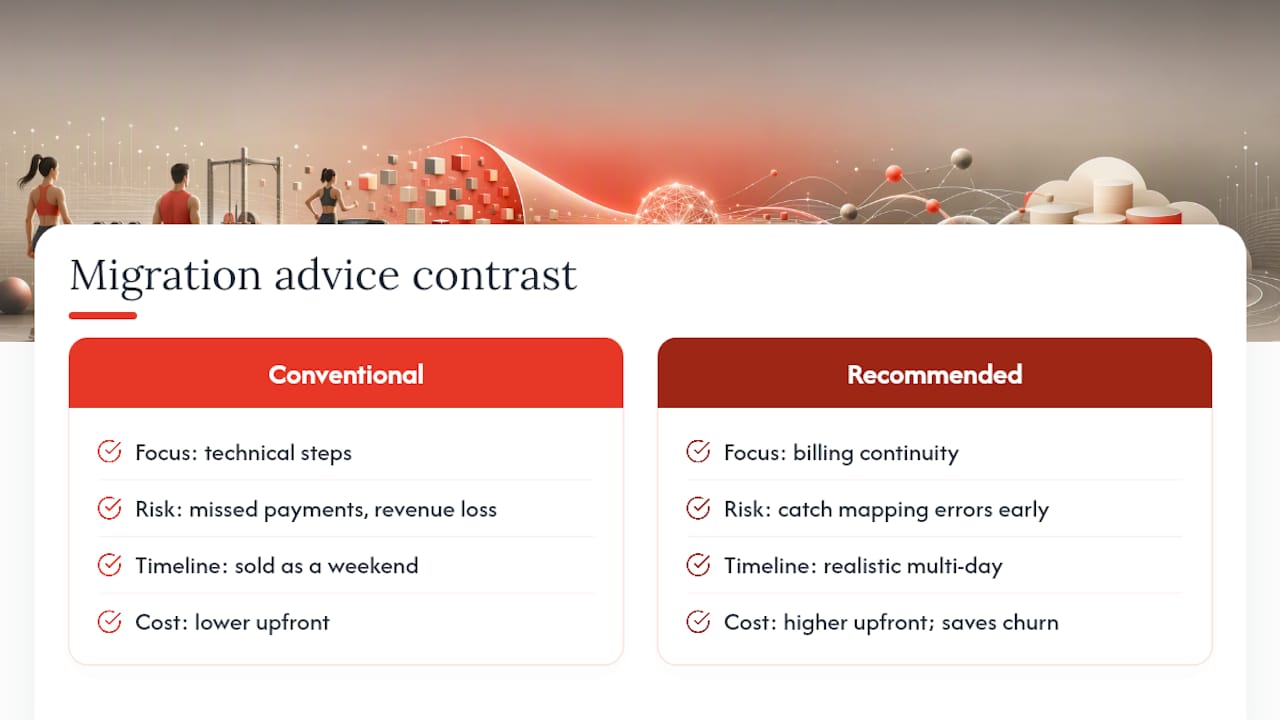
A missed payment token or a re-collection request that half your members ignore costs real revenue in the first billing cycle, not some abstract future risk. That’s why the sample import step matters more than gym owners assume going in. Testing 25 to 50 records before full cutover isn’t caution for its own sake. It’s the only way to catch a mapping error before it touches every member’s account at once.
The other place conventional advice falls short is timeline honesty. Self-service migrations get sold as a weekend project. For any gym with more than a couple of hundred active members and real billing complexity, that’s optimistic. Assisted migration costs more upfront but saves the far more expensive cost of member churn from a botched billing cycle. If you take one thing from this, prioritize the billing test over the aesthetics of the new dashboard. Members forgive a new interface. They don’t forgive a double charge.
— Louis
Get Migration Help or Book a Demo With Fitness Flow
Some platforms offer a choice of migration support levels matching gym complexity rather than a one-size-fits-all import wizard. Options range from self-service templates for clean data to assisted import support for billing tokens and custom fields, and concierge onboarding for multi-location operators handling mapping and validation.

If you’re weighing a gym management system migration right now, the fastest way to know what’s realistic for your gym is to talk to someone who has run the process before, not guess from a generic checklist. Request migration support or book a demo with Fitness Flow to get a field-mapping review and a realistic timeline for your member count and billing setup. For broader operational planning around growth and marketing during a software switch, gym-specific SEO guidance is a useful companion resource.
Sources
For platform-level detail on device data limits, see Google Fit’s connected apps guidance, FitMesh’s sync pattern breakdown, and Health Sync’s export format documentation.
- Connect other apps with Google Fit - Android - Google Fit Help
- Gym Software Migration Checklist 2026: Step-by-Step Guide
FAQ
What Are the Four Types of Data Migration?
The four common types are storage migration, database migration, application migration, and business process migration. For gyms, a software switch typically combines database migration (member and billing records) with application migration (moving to a new platform entirely).
What CRM Do Gyms Use?
Gyms typically use purpose-built gym management platforms rather than generic CRMs, since these combine member relationship tracking with billing, scheduling, and access control in one system. Fitness Flow is built specifically for this, pairing CRM functions with a branded member app and retention tools.
How Much Do Data Migration Consultants Make?
Rates vary widely by project scope and region, and no single figure applies to gym-specific migrations, since most gyms use vendor-provided assisted or concierge migration support rather than hiring independent consultants.
Is Gymdesk a Good Software?
Software fit depends on your gym’s size, billing complexity, and feature needs rather than a single universal answer. When comparing platforms, weigh migration support quality, billing token portability, and ongoing member engagement tools rather than price alone.
How Long Does a Gym Data Migration Take?
Self-service migrations for smaller gyms often complete within a few days, while assisted or concierge migrations for larger or multi-location gyms typically run several weeks once you include sample testing and staff training.