How to Sell On-Demand Classes at Your Gym

Treat your on-demand video library as a separate product line with its own pricing, onboarding flow, and app access — not as a bonus feature bolted onto your in-person membership. That single decision separates studios generating real recurring digital revenue from those that uploaded a few videos and wondered why nobody bought them.
Start with a minimum viable catalog of 50–100 videos spanning at least three or four class types (HIIT, strength, yoga, recovery), set a clear price point, and get your first class available for purchase within days, not months. Here is what to do in the first week:
- Identify 10–20 existing recorded classes you already own the rights to
- Choose a delivery platform (branded app or white-label OTT)
- Set up a payment processor and a simple checkout page
- Write three metadata fields per video: title, duration, difficulty level
- Send one email to your member list announcing the launch
Pro Tip: Don’t wait for a perfect catalog. Launch with 20 videos, announce it as “early access,” and use member feedback to shape the next 80.
Key Takeaways
Selling on-demand classes successfully requires treating digital content as a standalone product line with its own pricing, rights clearance, delivery platform, and onboarding sequence from day one.
PointDetails
Separate product line
Set distinct pricing, onboarding, and app access for on-demand; don’t bundle it as a free add-on.
Clear rights first
Secure instructor releases, participant waivers, and music sync rights before recording a single class.
Match model to catalog size
Use pay-per-class for under 30 videos; move to subscription at 50+ with regular weekly updates.
Track churn and completion
Monthly churn under 5% and completion rates of 60–80% are the two leading indicators of a healthy library.
Joinfitnessflow
Provides branded apps, native billing, automatic live-class archiving, and analytics to reduce launch time.
Table of Contents
- What do you need before you can sell on-demand classes?
- What pricing and packaging models actually work for studios?
- How should you deliver video: hosting, encoding, and access control?
- How do you handle payments, taxes, and refunds for digital class sales?
- What does a repeatable production workflow look like?
- What music licensing do you need to clear before publishing?
- How do you launch and market on-demand classes to your members?
- Which KPIs should you track for on-demand revenue?
- What does a 6–12 week launch timeline look like?
- What actually matters when you treat digital as its own product line
- Joinfitnessflow makes it faster to sell on-demand classes
- Sources
- FAQ
What do you need before you can sell on-demand classes?
Getting this checklist right before launch prevents the two most common delays: a rights dispute that forces you to pull content, and a payment setup that isn’t ready when members try to buy.
- Video assets in MP4 format, minimum 1080p, with accurate titles, duration, difficulty level, instructor name, and category tags
- Closed captions on every video (required for ADA compliance and strongly preferred by search algorithms on most platforms)
- Instructor release forms signed before recording, covering both the performance and the likeness rights for commercial distribution
- Participant waivers that explicitly cover recorded and distributed content, not just in-person sessions
- Music rights cleared before a single video goes live (more on this in the legal section)
- Payment processor configured: Stripe, Square, or your gym management platform’s native billing
- A CMS or OTT platform provisioned with your branding, or a branded app through your gym software
- Analytics access so you can track views, completions, and revenue from day one
- Instructor compensation policy for recorded content documented in writing before production starts
- Customer support routing so members know where to go when a video won’t play
On the operational side, decide now who owns each item above. Assign a name, not a department.
What pricing and packaging models actually work for studios?
The right model depends on how large your library is and how often you add content. Pay-per-class (TVOD), monthly subscriptions (SVOD), and hybrid bundles each fit a different stage of catalog maturity.
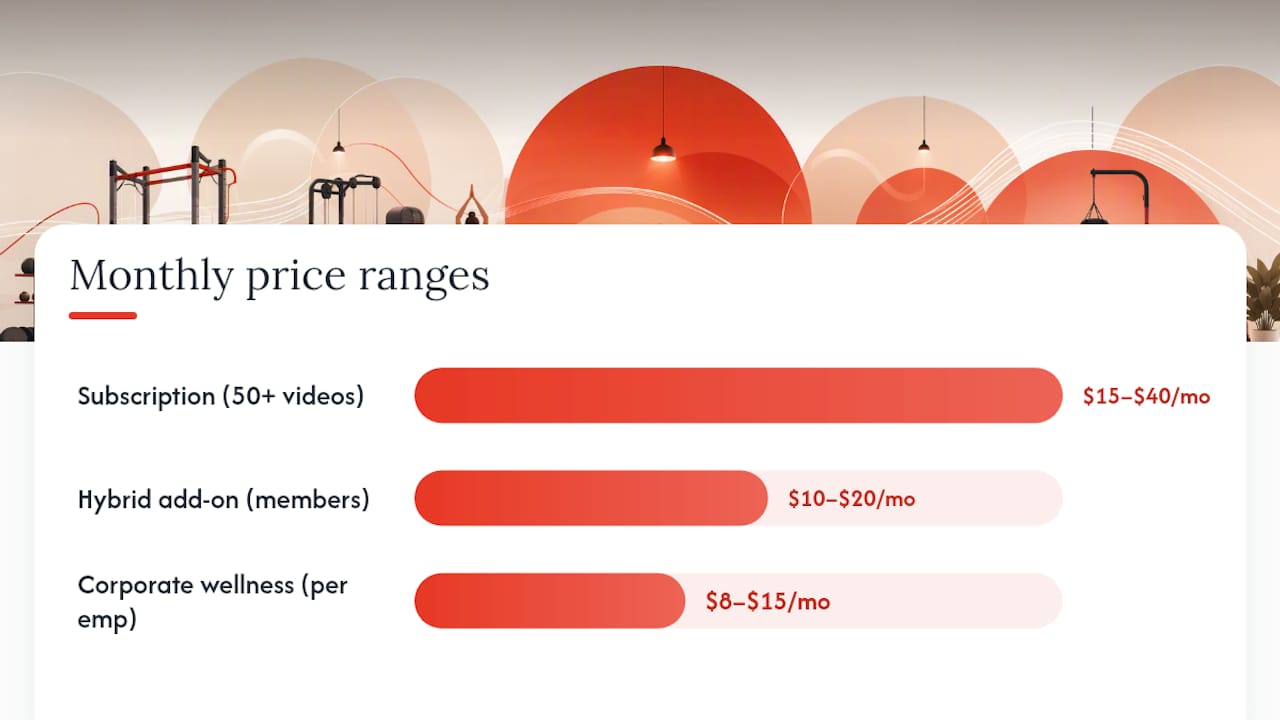
- Pay-per-class (TVOD): $3–$8 per class works well for small libraries under 30 videos. Members pay only for what they use, which lowers the commitment barrier.
- Monthly subscription (SVOD): $15–$40/month fits libraries of 50+ videos with regular new content. This is where recurring digital revenue starts to compound.
- Hybrid bundle: Offer a digital add-on to in-person memberships at $10–$20/month. This is often the fastest conversion because the member already trusts you.
- Corporate wellness packages: Bulk access for local employers at negotiated rates, typically $8–$15 per employee per month.
Library size and refresh cadence directly affect what price the market will accept. A library that adds two or three new classes per week can sustain a $30–$40 subscription. One that hasn’t been updated in three months will see churn spike regardless of price.
Pro Tip: Before you set a public price, offer your most engaged in-person members a 30-day trial at your target price point. Their feedback on value is more reliable than any benchmark.
Library sizeRecommended modelSuggested price range
Under 30 videos
Pay-per-class
$3–$8 per class
30–100 videos
Low-cost subscription or PPV
$15–$40/month
100+ videos, weekly updates
Full subscription
$15–$40/month
In-person members add-on
Hybrid bundle
$10–$20/month
How should you deliver video: hosting, encoding, and access control?
Most studios don’t want to become video-engineering operations. White-label OTT platforms handle transcoding, DRM, billing, and native app delivery so you can focus on content and community rather than infrastructure. That’s the practical winner for most independent gyms.
The alternative, building a custom app on top of cloud hosting (AWS, Cloudflare Stream), gives you more control but adds months to your timeline and requires ongoing technical maintenance.
Minimum technical checklist before launch:
- Adaptive bitrate streaming (HLS or DASH) for reliable playback on slow connections
- DRM or watermarking to prevent unauthorized redistribution
- Automatic archiving of live classes so they become on-demand content without manual uploads
- Device support confirmed: iOS, Android, web browser, and at least one TV platform
- A structured catalog organized by program type, duration, difficulty, and instructor
Access control basics:
- Map each purchase to a specific access window (30-day rental, lifetime, or active subscription)
- Set device limits per account (two to three concurrent streams is standard)
- Enable single sign-on so existing members don’t create a second account
Pro Tip: Test your stream on a real member’s phone on a 4G connection before launch day. Studio Wi-Fi masks buffering problems that will frustrate members at home.
How do you handle payments, taxes, and refunds for digital class sales?
A clean checkout flow reduces abandoned purchases. Offer a free trial (7 or 14 days), a coupon code for your launch promotion, and a one-click upgrade path for in-person members who want to add digital access.
- Entitlement logic: Confirm that access is revoked automatically when a subscription lapses or a rental window closes. Manual revocation creates support tickets.
- Tax: Digital goods are subject to sales tax in most U.S. states, but the rules vary significantly by state. Collect tax where your platform or payment processor identifies nexus, and consult a tax advisor for state-specific obligations before you scale.
- Receipts: Send an automated receipt with the class or subscription name, amount, and access period clearly stated. This alone cuts “I don’t know what I paid for” chargebacks significantly.
- Refunds: A 48-hour no-questions refund window for first-time buyers reduces purchase hesitation without meaningfully hurting revenue. After that, offer credit toward another class rather than a cash refund.
Pro Tip: Set your refund policy in writing before launch and display it on the checkout page. Ambiguity is the primary driver of chargebacks.
What does a repeatable production workflow look like?
Recording a class once and selling it indefinitely is the core economic argument for on-demand. The workflow below keeps quality consistent across instructors.
- Pre-production: Confirm music rights, brief the instructor on camera framing and pacing, and prepare a class outline with timestamps
- Filming: Use a fixed camera at chest-to-head height, a lavalier or directional mic for the instructor, and consistent lighting (avoid windows behind the instructor)
- Editing: Cut to a standard template: 30-second intro, full class, 60-second cool-down outro. Keep total length between 20 and 60 minutes
- Captions: Generate captions automatically (Rev, Descript, or your platform’s built-in tool), then review for accuracy before publishing
- Metadata: Title, instructor name, duration, difficulty (beginner/intermediate/advanced), category, and a 2–3 sentence description
- Publishing: Upload, set access rules, schedule the release, and confirm playback on two devices before going live
Content breadth matters more than raw video count. Recovery and mobility classes tend to drive long-term engagement even when their view counts are lower than HIIT sessions. Build those into your catalog from the start.
Pro Tip: Record instructor compensation terms in a signed addendum before the first camera rolls. “We’ll figure it out later” creates disputes when a class becomes a top seller.
What music licensing do you need to clear before publishing?
Streaming a class with unlicensed music is the fastest way to have your content pulled and your account flagged. The rights you need for recorded fitness content are different from what covers a live class.
- Public performance rights (PRO licenses from ASCAP, BMI, SESAC) cover live in-studio play but do NOT cover recorded video distributed online
- Synchronization rights are required to pair a song with recorded video; these must be negotiated directly with the music publisher
- Master use rights cover the specific recording of a song and must be cleared with the record label
- Production music libraries (Musicbed, Artlist, Epidemic Sound) bundle sync and master rights in a single annual license, which is the practical solution for most studios
- Custom or commissioned tracks eliminate licensing complexity entirely for studios producing high volumes of content
Participant release forms must explicitly cover commercial distribution of recorded content, not just in-studio participation. Keep signed copies in a secure, searchable file.
Pro Tip: Switch your instructors to production music library tracks before you record a single class. Retrofitting music rights after recording is expensive and sometimes impossible.
This is general guidance. Consult a licensed attorney for jurisdiction-specific licensing questions and complex IP arrangements.
How do you launch and market on-demand classes to your members?
Virtual-only subscribers need a separate onboarding path from in-person members. They’ve never walked your floor, so every navigation decision that feels obvious to you is a friction point for them.
**Virtual-only onboarding sequence: **
- Welcome email with a direct link to the library and a “Start here” playlist
- Day 3 check-in email with the three most popular beginner classes
- Day 7 push notification or SMS: “Have a question? Reply to this message”
30-day launch plan:
- Week 1: Announce to existing members via email and in-studio signage; offer a 14-day free trial
- Week 2: Post three class preview clips on Instagram and Facebook; run a paid social campaign targeting your zip code
- Week 3: Send a referral incentive to trial members who haven’t converted
- Week 4: Launch a 30-day challenge using on-demand content to drive daily logins
For gym lead generation beyond your existing member base, paid social targeting fitness-interested adults within 10 miles of your studio is the fastest channel. Gym SEO services can build longer-term organic discovery for your class library pages.
Retention mechanics that work: weekly content drop notifications, monthly themed challenges, and a “program journey” that sequences classes over 4–8 weeks so members always know what to do next. Gym challenge ideas tied to your on-demand catalog give members a reason to log in daily rather than only when they feel motivated.

Which KPIs should you track for on-demand revenue?
Track these weekly for the first 90 days, then monthly once you have a baseline.
Primary KPIs:
- Subscriber count and month-over-month growth rate
- Average revenue per user (ARPU)
- Churn rate (target: under 5% monthly for a subscription product)
- Content completion rate (a proxy for class quality)
- Views per subscriber per week
Secondary KPIs:
- Conversion rate from in-person members to digital add-on
- Per-class purchase rate for PPV titles
- Refund and chargeback rates
MetricHealthy rangeAction if out of range
Monthly churn
Under 5%
Audit content freshness and onboarding sequence
Completion rate
60–80%
Review class length and pacing
ARPU
$15–$40/month
Test price increase or upsell to higher tier
In-person conversion
10–20%
Add in-studio upsell touchpoints
Pro Tip: Run one pricing A/B test per quarter, not per month. Digital fitness subscriptions need 60–90 days of data before a pricing signal is statistically meaningful.
What does a 6–12 week launch timeline look like?
- Weeks 1–2: Finalize platform selection, sign instructor and participant release forms, clear music rights, and document instructor compensation policy
- Weeks 3–6: Production block: record, edit, caption, and upload your initial catalog; configure payment gateway and access control rules
- Weeks 7–9: QA sprint: test playback on all target devices, verify entitlement logic, configure analytics, and build onboarding email sequences
- Weeks 10–12: Soft launch to existing members, collect feedback, fix friction points, then open to the public with a paid marketing push
A 30–90 day launch playbook can compress this timeline if your rights and platform are already in place.
Pre-launch checklist:
- All videos captioned and metadata complete
- Payment processor tested with a real transaction
- Refund policy published on checkout page
- Onboarding email sequence active
- Analytics confirmed receiving data
- Support routing documented and tested
Pro Tip: Do a “friends and family” soft launch 72 hours before the public announcement. Real users find checkout and playback bugs that internal testing misses.
What actually matters when you treat digital as its own product line
Studios that add on-demand as an afterthought consistently underperform those that treat it as a standalone business. The difference isn’t production budget or catalog size. It’s whether someone in the organization owns the digital product the same way a manager owns the in-person schedule.
The most common mistake I see: studios launch with 15 videos, price them too low to feel like a real product, and then wonder why members don’t take it seriously. Members mirror your conviction. If the digital library looks like a side project, it gets treated like one.
One tactic that works consistently: record your three highest-attended live classes first. Those are already proven. Members who missed them in person will pay to access them on demand. That’s your proof of concept, and it funds the next production block.
Joinfitnessflow was built by people who’ve run gyms, which means the platform’s on-demand architecture reflects operational reality rather than a developer’s assumptions about how fitness studios work.
*— Louis
Joinfitnessflow makes it faster to sell on-demand classes
Independent gyms that launch on-demand with Joinfitnessflow skip the infrastructure problem entirely. The platform includes branded iOS, Android, and web apps; native billing with subscription and pay-per-class entitlements; automatic archiving of live classes into your on-demand library; and analytics that show you exactly which classes drive retention.
That means the 6–12 week timeline above compresses significantly when you’re not stitching together a payment processor, a video host, and a custom app from separate vendors. Your revenue stays with your studio, your member data stays in your system, and your branded app looks like you built it from scratch.
Start a demo to see how Joinfitnessflow maps to the checklist in this guide and how quickly your first on-demand class can go live.
Sources
- Virtual & Hybrid Fitness Classes: A Gym Growth Playbook
- On-Demand Fitness Content Your Gym Should Include | Fitness On Demand
- Build a Fitness Streaming Platform Like Peloton — But Yours - Bamboo Cloud
This article is general information, not a substitute for advice from a qualified lawyer. Consult a qualified legal professional about your own circumstances before acting on anything here.
FAQ
How many videos do I need before launching on-demand classes?
A minimum viable library is 20–30 videos for a pay-per-class model, or 50–100 for a subscription. Launch early with what you have and add content weekly.
What music can I use in recorded fitness classes?
You need synchronization and master use rights for any commercial track. Production music libraries like Musicbed, Artlist, or Epidemic Sound bundle both rights in a single annual license and are the practical choice for most studios.
How do I price on-demand classes for existing gym members?
Offer a digital add-on at $10–$20/month for in-person members. This is the fastest conversion because trust is already established, and it creates a second revenue stream without acquiring a new customer.
Does Joinfitnessflow support both live and on-demand video?
Yes. Joinfitnessflow includes live and on-demand video, automatic class archiving, branded member apps, and native billing, so studios manage both formats from one platform.
Do I need to collect sales tax on digital fitness subscriptions?
In most U.S. states, yes. Digital goods and subscriptions are taxable in the majority of states, though rules vary. Consult a tax advisor to confirm your nexus obligations before scaling.