
Gym Software Pricing: How to Calculate True Monthly Cost

Most gym management platforms list a subscription within a typical range of monthly prices, but that number rarely predicts what you actually pay. The real bill comes from three variables layered on top of the sticker price: payment processing fees, per-member charges as you grow, and add-on modules that started “optional” and became mandatory by month four.
Here’s the short version before you get into the math:
- Sticker price range: most independent gyms see monthly pricing vary with member count and feature tier
- Real cost driver: transaction fees and add-ons typically outweigh the base subscription within a year
- What to do next: run a total cost of ownership (TCO) calculation using your actual member count and monthly payment volume before signing anything
Key Takeaways
Gym software pricing is determined less by the subscription sticker price than by payment processing fees, add-on modules, and how the pricing model behaves as your membership grows.
Table of Contents
- What Are the Main Gym Software Pricing Models?
- What Costs Hide Inside a Gym Software Quote?
- What Does Gym Software Actually Cost for Different Gym Sizes?
- How Do You Calculate Total Cost of Ownership for Gym Software?
- How Do You Choose the Right Gym Software Plan?
- How Does an Integrated Platform Change the Cost Equation?
- What Should You Actually Prioritize When Comparing Gym Software Pricing?
- Get a Real Cost Comparison With Fitness Flow
- Sources
What Are the Main Gym Software Pricing Models?
Vendors price gym management software four ways, and each one rewards a different kind of business.
Per-member pricing charges a small fee for every active member in your system, often $0.50 to $2 per member per month. It looks cheap at 50 members. At 400 members, that same rate can quietly cost more than a flat unlimited plan. Per-member pricing punishes growth, which is the opposite of what you want from software meant to help you scale.
Flat monthly pricing charges one price regardless of headcount. MemberDay advertises this model with a $29/month entry point and no per-member surcharge, which makes budgeting predictable for a studio that expects to grow past a few hundred members. Flat pricing tends to win once a club crosses a specific member threshold, because the subscription cost stays fixed while per-member competitors keep climbing.
Tiered plans bundle features into packages, usually Starter, Growth, and Pro. Join It structures its plans this way, starting at $29/month, with a service fee of 1.5% to 3% on paid transactions layered on top depending on which tier you pick. The tier you need often isn’t the tier the vendor pushes hardest.
Enterprise contracts apply to multi-location operators and typically involve custom quotes, admin-seat pricing, and negotiated processing rates. What sits “behind” enterprise tiers usually includes centralized reporting across locations, role-based permissions, and dedicated onboarding, features a single-location gym rarely needs.
A plan that emphasizes “per member” pricing without a cap or unlimited option may scale poorly as membership grows.
What Costs Hide Inside a Gym Software Quote?
The subscription fee is the easy part. Four other cost layers determine whether a “cheap” platform ends up expensive.
Subscription fees come in flat, per-admin-seat, or per-feature structures. Read the footnotes closely. Some vendors cap the number of staff logins on lower tiers, then charge per additional seat, a detail that rarely shows up until your front desk staff tries to log in and can’t.
Payment processing is where most gyms lose track of their real spend. Stripe documents standard card processing around 2.9% plus $0.30 per transaction in typical U.S. pricing, and it offers ACH bank transfers as a cheaper alternative for recurring billing. The bigger issue is markup: some platforms let you connect your own Stripe account and pay only Stripe’s rate, while others route payments through their own merchant account and tack on an extra percentage. That markup, often invisible on the pricing page, can add hundreds of dollars a month once you’re processing real volume.
Chargebacks and refunds add another layer of risk. Industry guidance on gym-specific insurance and financial risk points out that chargeback fees and refund processing should be modeled into your contingency budget, not treated as a rare surprise.
Add-ons are where “all-in-one” platforms and stripped-down platforms diverge sharply. Common extras include:
- A branded member app (frequently $50 to $150/month extra on modular platforms)
- A public-facing website or booking page
- Retail or merchandise point-of-sale integration
- Marketing automation and email/SMS campaigns
Membership platforms commonly gate features like API access and white-label branding behind their highest-priced tiers, which is exactly why counting your must-have features before comparing sticker prices matters more than the headline number.
Setup and migration costs are typically one-time, covering data import, staff training, and integration configuration. Push hard here. Onboarding that a vendor tries to bill separately is often something a competitor includes for free, and it’s one of the easiest line items to negotiate away entirely.
One pattern worth flagging: aggregated reviews on Capterra repeatedly show gym owners complaining about processing markups and add-on costs that weren’t obvious during the sales call, even when the base subscription looked competitive.
What Does Gym Software Actually Cost for Different Gym Sizes?
Numbers make this concrete. Here are three profiles, each built on realistic assumptions.
1. Small studio, 120 members, $110 average monthly payment per member.
A flat-rate plan at $79/month plus Stripe processing at roughly 2.9% + $0.30 per transaction runs about $79 (subscription) + $383 (processing on $13,200 in monthly billing) = around $462/month. Add a branded app module at $75/month and you’re near $537. If this studio instead chose a per-member plan at $1.50/member, that’s another $180/month, pushing the total past $700 for the exact same feature set.

2. Mid-size gym, 450 members, $95 average monthly payment.
This is where per-member pricing starts to hurt. At $1.50 per member, that’s $675/month before processing fees even enter the picture. A flat unlimited-member plan like Membee’s tiered structure, which advertises zero platform-level transaction fees, could run $199 to $299/month flat, plus Stripe processing on $42,750 in monthly billing (roughly $1,240 at standard rates). Total for the flat approach is around $1,500 to $1,600/month, versus $1,900+ for the per-member equivalent once you add comparable processing costs. The crossover point where flat pricing wins usually lands somewhere between 250 and 350 active members, depending on your per-member rate.
3. Multi-location operator, three locations, 1,100 total members, centralized billing.
Enterprise contracts typically add admin-seat costs (often $30 to $60 per manager login) and centralized payroll or reporting integration fees. Enterprise contracts typically add admin-seat subscription costs plus transaction processing fees on total revenue. If total monthly payment volume across locations is $110,000, processing alone lands near $3,190 at standard card rates. ACH options can meaningfully cut that number for recurring membership dues, since ACH transfers avoid the percentage-based card fee structure entirely.
Revenue mix matters more than owners expect. A gym that runs frequent class-pack sales, event tickets, and retail transactions processes more individual charges than one running simple monthly autopay. More transactions mean more per-transaction fees stacking up, even if total revenue is identical to a gym with fewer, larger charges. Model your actual transaction count, not just your revenue total.
How Do You Calculate Total Cost of Ownership for Gym Software?
Run this checklist before comparing any two vendors side by side:
- Base subscription — the advertised monthly or annual fee for your required tier.
- Transaction fees — percentage plus flat fee per transaction, multiplied by your actual monthly transaction count (not total revenue).
- Platform markup — the difference between what the platform charges you and what your own merchant account would charge directly.
- Add-ons — every module you’ll realistically need within twelve months, not just at launch.
- Setup costs, amortized — divide any one-time onboarding fee across 12 months to see its real monthly impact.
- Admin-hours-saved value — estimate hours saved per week on scheduling, billing, and follow-up, multiplied by your effective hourly cost of labor.
A simple formula: TCO = Subscription + (Transaction % × Monthly Volume) + (Flat Fee × Transaction Count) + Add-ons + (Setup ÷ 12) − Value of Time Saved
Pro Tip: Re-run this calculation every quarter, not once a year. Member growth and shifts in your payment mix (more class packs, fewer straight monthly memberships) can move your effective cost by hundreds of dollars without the subscription price changing at all.
How Do You Choose the Right Gym Software Plan?
Prioritize four things before you look at a single price tag: cost predictability, control over your own payment processing, a clear line between necessary and optional features, and how much work migration will take.
Ask vendors these questions directly on a sales call:
- “Can I connect my own Stripe or merchant account, or does everything route through your platform?”
- “What happens to my price if I double my member count in twelve months?”
- “Which features on this tier become mandatory upgrades within a year, based on your existing customers?”
- “What’s included in onboarding, and what costs extra?”
- “What’s the cancellation notice period, and are there early-termination fees?”
Watch for these red flags:
- Processing fees that aren’t disclosed until after you’ve signed a contract
- Mandatory onboarding fees paired with a long, multi-week implementation timeline
- Annual contracts with no month-to-month option and steep early-cancellation penalties
- Pricing pages that hide the transaction fee percentage in fine print rather than the headline
Contract length changes your real cost more than most owners expect. A 12-month contract at a lower monthly rate can cost more than a flexible month-to-month plan if you need to switch vendors mid-year, and cancellation fees can erase any savings from the lower sticker price. If you’re consolidating multiple tools into one platform, an operations planning framework can help you map out what needs to migrate and when, so the transition itself doesn’t become a hidden cost.
How Does an Integrated Platform Change the Cost Equation?
Every add-on you avoid buying separately is money that stays out of your monthly bill. Fitness Flow was built around that idea: one platform for scheduling, billing, member engagement, and a fully branded app, instead of stitching together three or four separate subscriptions.
Gym owners using an integrated approach see measurable results: Fitness Flow reports a 27% average increase in member retention and 12 hours saved on administrative tasks each week.
Twelve hours a week at even a modest $20/hour administrative rate is worth roughly $960 a month in labor time. That’s real money that offsets subscription cost, something a per-module pricing structure can’t offer, since you’re paying separately for each convenience instead of getting it built in.
What Should You Actually Prioritize When Comparing Gym Software Pricing?
Most buying guides tell you to “compare features side by side.” That advice undersells the real problem: features are easy to compare, and pricing structures are designed to make cost comparison hard. A per-member plan and a flat plan can look identical on a features checklist while producing wildly different bills at 400 members.
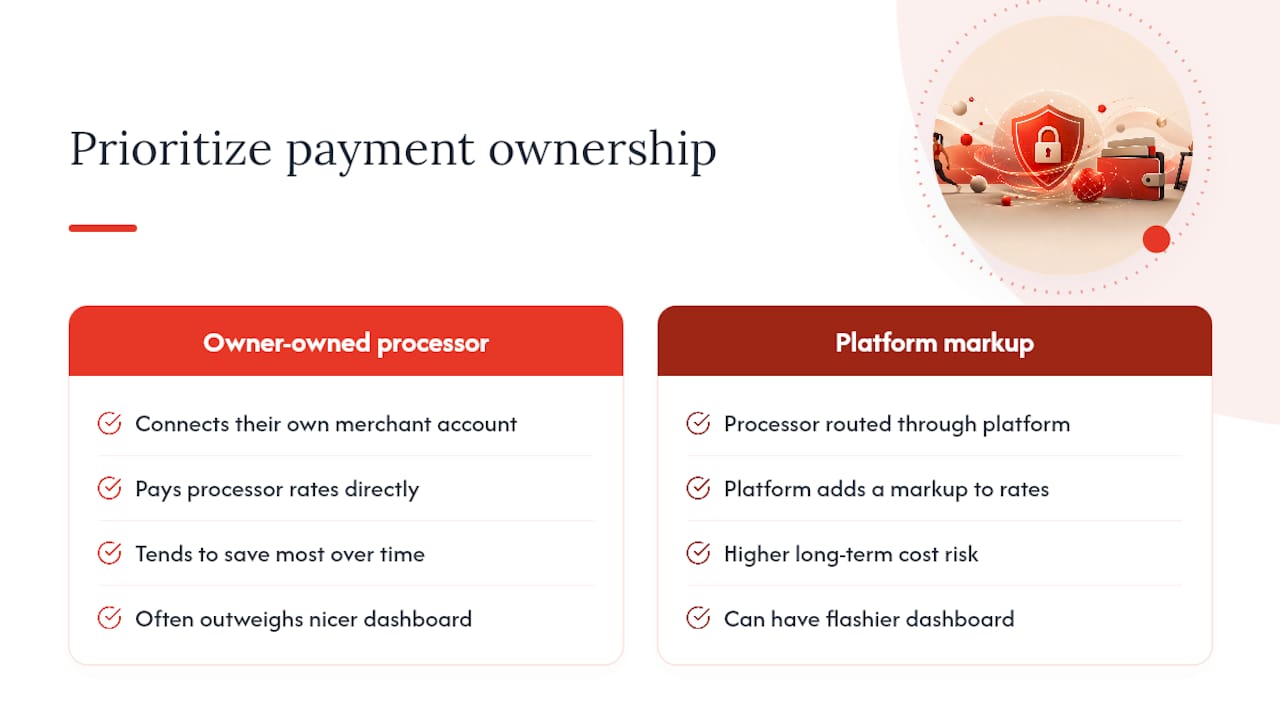
What actually matters is asking who owns the payment processing relationship. Owners who connect their own merchant account and pay processor rates directly, rather than routing through a platform markup, tend to save the most over time, and that single decision often outweighs which vendor has the flashier dashboard.
I’d also push back on the instinct to chase the cheapest sticker price. The math in this guide shows that a $29 flat plan and a $199 plan can land in the same monthly cost range once you add the modules the cheap plan forces you to buy separately. Run the TCO formula before you compare quotes, not after you’ve already picked a favorite.
— Louis
Get a Real Cost Comparison With Fitness Flow
If you’ve run the TCO math above and you’re staring at a spreadsheet full of add-on fees, processing markups, and separate subscriptions for your app, your website, and your billing tool, there’s a simpler path: Fitness Flow folds sales tracking, scheduling, billing, and a branded member app into one subscription, which means fewer line items competing for your budget every month.

For a gym owner comparing quotes right now, the practical advantage is fewer surprise costs after signing, since features that other vendors sell as add-ons come built into the platform. Combined with the reported 27% average retention lift, the effective cost per retained member often comes out lower than a patchwork of cheaper individual tools. If you want to see how the numbers work out for your specific member count and payment volume, request a demo at Fitness Flow and ask for a side-by-side cost breakdown against your current setup.