
Membership Freezes Gym Software Must Get Right

A membership freeze must be a date-bounded record that drives billing, access, and reporting, not a status flag someone flips on and forgets to flip off. That single design choice separates gym software that handles freezes cleanly from software that generates billing disputes every month.
Here’s the short verdict: build freezes as records with a request date, a start date, and an optional end date, then compute everything else — billing, access, reporting — from those dates. This prevents billing debris, supports preview-before-commit, and automates reactivation without a staffer remembering to do it manually.
What engineering needs to hear:
- A freeze entity with real fields, not a boolean
- A billing engine that swaps fees automatically inside the freeze window
- A non-persisting preview mode that shows the member exactly what happens
- Derived status computed from dates, never stored separately
- Freeze fees configured per package, captured per member at signup
Key Takeaways
A membership freeze works correctly only when it exists as a date-bounded record that billing, access, and reporting derive from automatically.
PointDetails
Freeze as record, not flag
Store request date, start date, and optional end date; compute status from those fields.
One billing code path
Preview and commit must run identical logic so the dry run never misleads the member.
Fee snapshots at signup
Capture each member’s agreed freeze fee so future price changes don’t rewrite their history.
Tag every freeze charge
Reference the freeze_id on each charge so support can resolve billing questions in seconds.
Joinfitnessflow’s approach
The Membership accelerator implements this exact pattern with per-package fees and preview-and-commit billing.
Table of Contents
- Core Design Principles For A Gym Membership Freeze Policy
- What Fields Belong In The Freeze Data Model?
- How Should Billing Actually Change During A Freeze?
- How Do You Configure Freeze Fees Without Creating A Pricing Mess?
- What Should Members See Before They Confirm A Freeze?
- How Should Staff Handle Freeze Edits And Disputes?
- What Should Be On A Pre-Launch Implementation Checklist?
- How Joinfitnessflow’s Membership Accelerator Applies This Pattern
- Why Independent Gym Operators Built It This Way
- See The Membership Accelerator In Action
- Sources
- FAQ
Core Design Principles For A Gym Membership Freeze Policy
Most billing disputes trace back to one bad decision: treating a freeze as a flag someone sets and later forgets to unset. Fix the model and you fix most of the downstream mess.
- Model freezes as first-class records. Each one needs a request date, a start date, an optional end date, and an origin (member, staff, or system-triggered).
- Derive state, don’t store it twice. A membership freeze should be a date-bounded record that billing and status get computed from, rather than a separate status field that can drift out of sync with reality.
- One code path for preview and commit. If your dry run and your actual billing run use different logic, your preview is just a guess.
- Every freeze charge references the freeze record. No exceptions, no orphaned line items.
- Freeze fees live per package and per site, with the member’s agreed number locked in at signup.
Pro Tip: If your current system lets a staffer manually override a member’s status without touching a freeze record, you already have a data integrity problem. Audit that first.
What Fields Belong In The Freeze Data Model?
The freeze record itself should stay lean but complete. At minimum, you need: freeze_id, member_id, request_date, request_by, start_date, end_date (nullable for open-ended freezes), origin, agreed_freeze_fee, package_snapshot_id, created_at, updated_at, notes, and an audit_events array.
That package_snapshot_id matters more than it looks. It points to the pricing the member actually agreed to, not whatever your current price list says. Freeze fees should exist per package and per site, with the specific fee a member agreed to captured on their membership record so later price changes don’t quietly rewrite history.
Derived state works like this: active unless a freeze record’s start and end dates bracket today, in which case frozen; cancelled if a cancellation record exists with no override. A rough JSON shape for handoff:
{
"freeze_id": "frz_2291",
"member_id": "mem_5510",
"start_date": "2026-03-01",
"end_date": null,
"agreed_freeze_fee": 15.00,
"package_snapshot_id": "pkg_v3_annual",
"origin": "member"
}
Pro Tip: Keep end_date nullable rather than defaulting it to some far-future date. Null means “genuinely open-ended,” and your reporting queries need to be able to tell the difference.
How Should Billing Actually Change During A Freeze?
The billing engine needs rules it follows without a human checking every invoice by hand.
- Fee swap on every billing date inside the window. When a billing date falls inside the freeze window, the recurring membership fee gets replaced by the configured freeze fee, generated through the same billing run and the same charge record type as a normal invoice.
- Suspend add-ons and discounts by default. Ad-hoc charges, add-on subscriptions, and promotional discounts should pause for the duration unless your policy explicitly says otherwise for a specific package.
- Tag every freeze-period charge with the
freeze_id. When a member emails asking why they were charged $15 in April, support pulls one record and has the answer in seconds instead of digging through a payment processor. - Handle partial periods deliberately. Freezes that start or end mid-cycle need explicit proration rules, and tax treatment on freeze fees should be defined up front rather than improvised at month-end.
- Test with a dry run before anything persists. The preview should report the exact charges and exact status changes that will result, using the identical logic the commit step will run.
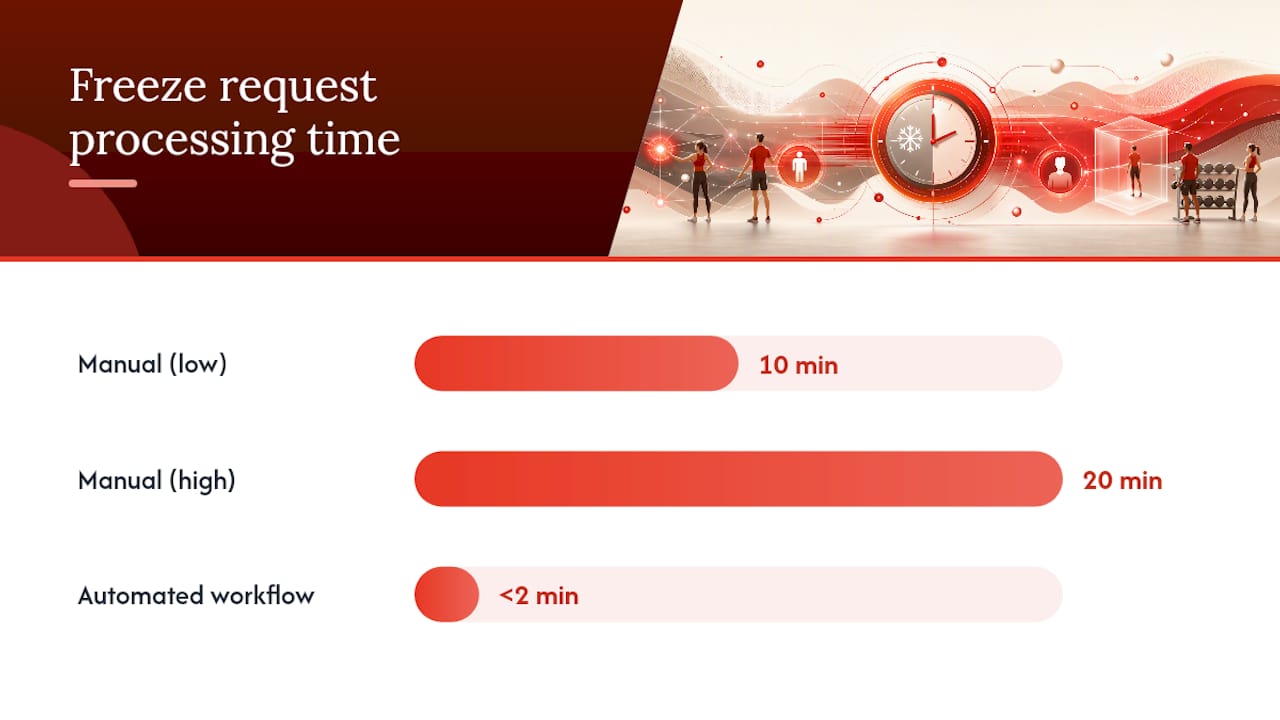
The operational case for getting this automated is concrete. Manual freeze processing runs 10 to 20 minutes per request, while an automated workflow handles the same lifecycle in under two minutes and removes most of the manual billing errors that come from someone fat fingering a date in a spreadsheet.
Pro Tip: If your dry run and your commit step aren’t running the same function, you don’t actually have a preview. You have a separate estimate that might be wrong.
How Do You Configure Freeze Fees Without Creating A Pricing Mess?
Freeze fees need the same structural discipline as your regular pricing, or you end up with inconsistent charges across locations and no way to explain them.
- Store freeze fees per package, per site, so a downtown boutique studio and a suburban location under the same brand can charge differently if that’s the policy.
- Capture the member’s agreed fee at signup as a snapshot, and reference that snapshot for every future freeze that member requests.
- Run scheduled price changes through the same effective-date workflow you use for recurring fees, so freeze pricing doesn’t quietly fall out of sync.
- Common practice varies: some gyms charge a nominal monthly hold fee, some charge a flat admin fee once, and some waive fees entirely for documented medical freezes.
- Never let a list-price update silently overwrite an existing member’s agreed freeze fee. Always reference their snapshot, not the current catalog price.
What Should Members See Before They Confirm A Freeze?
The front-desk and app experience should follow a predictable sequence: intake, eligibility check, preview, confirmation, commit.
- Structured intake. A form or app screen captures the requested start date and reason, whether submitted by the member or staff.
- Eligibility check. Verify the member qualifies under your freeze policy (contract terms, freeze count this year, minimum notice).
- Non-persisting preview. Show the exact charges and exact status change before anything saves. Running the freeze through identical logic in a dry run and showing the member the resulting charges removes ambiguity before they commit.
- Confirmation and commit. Only after the member confirms does the system persist the record and lock in access changes.
- Reminders. Send confirmation at freeze start, a reminder seven days before reactivation, and a welcome-back message once billing resumes.
Access policy during the freeze should be a deliberate choice, not a default: block access entirely, allow access but pause new bookings, or let members burn existing credits. Pick one per package and apply it consistently.
Pro Tip: Reactivation surprises cause more disputes than the freeze itself. A reminder seven days out cuts down “I forgot I was still frozen” tickets significantly.
How Should Staff Handle Freeze Edits And Disputes?
Day-to-day operations need clear rules for who can touch a freeze record and how support resolves complaints.
- Staff creating or editing a freeze should log an audit event tied to their user ID, not just a silent database update.
- Extending or shortening a freeze means updating the record’s dates, letting billing and status recalculate automatically rather than requiring a separate manual fix to an invoice.
- Support resolves disputes by pulling the
freeze_idreferenced on the disputed charge and, if needed, running a non-persisting simulation to show exactly what should have happened. - Reporting needs to expose active freeze count, freeze-caused revenue, pending reactivations, and frozen-member retention. Proper reporting must expose frozen-state metrics and freeze-caused charges so finance and retention teams can actually measure the impact instead of guessing at it during month-end close.
- Exceptions matter: retroactive freeze requests need a reconciliation path, failed payments during a freeze need a defined retry policy, and members with no card on file need a manual billing flag rather than a silent failure.
Pro Tip: If a member’s freeze request comes in three days after they stopped showing up, decide your backdating policy now, not during the argument. A written limit (say, five business days) removes the guesswork.
What Should Be On A Pre-Launch Implementation Checklist?
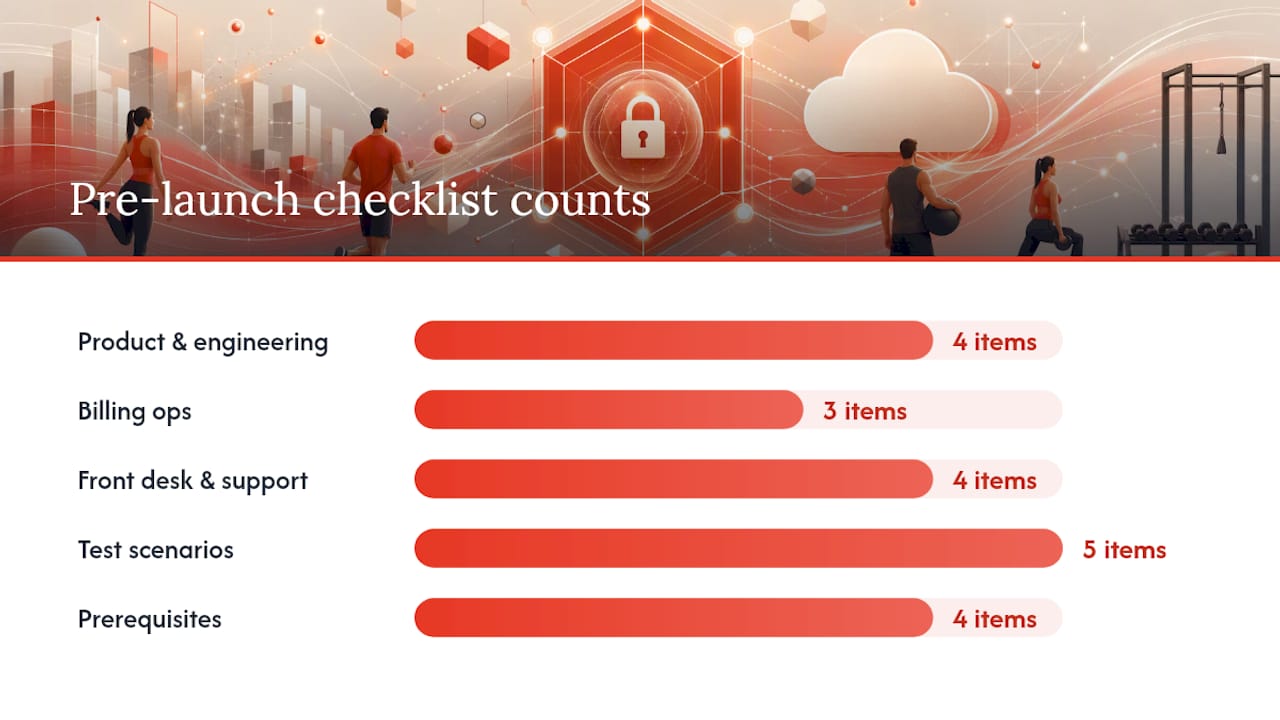
Before this ships, four teams need their own short list.
- Product and engineering: data model changes for the freeze entity, billing engine adjustments for the fee swap, the preview dry-run endpoint, and API routes for creating and editing freezes.
- Billing ops: confirm per-member fee snapshots are captured at signup, per-package freeze fees are configured for every site, and scheduled price-change tests explicitly include freeze fees.
- Front desk and support: an intake form, clear permissions on who can create or edit a freeze, confirmation message templates, and a short training script for handling common questions.
- Test scenarios before launch: a single-month freeze, an open-ended freeze, overlapping freeze requests on the same account, a backdated request, and a mid-freeze extension.
A workable rollout also assumes some basics are already in place. Automation prerequisites include API access to your membership platform, a documented freeze policy, member contact records with valid email or SMS, and payment methods on file, since none of this works without clean underlying data.
Pro Tip: Run the backdated-request test scenario early. It’s the one that exposes whether your reconciliation logic actually works or just looks like it does on a whiteboard.
How Joinfitnessflow’s Membership Accelerator Applies This Pattern
Joinfitnessflow’s Membership accelerator builds freezes exactly this way: as records with request, start, and end dates, not as a toggle. Billing swaps to the configured freeze fee automatically, add-ons pause, and every freeze-period charge carries a reference back to the freeze record that caused it.
The capabilities in practice:
- Freeze fees configured per package and per site
- Per-member agreed price snapshots that survive future price changes
- Freeze-tagged charges for a clean audit trail
- A preview-and-commit flow that runs the same logic both times
If you’re specifying this feature for your own gym, testing it against your actual freeze scenarios, backdated requests included, tells you more than reading a spec sheet ever will.
Why Independent Gym Operators Built It This Way
We’ve watched gyms lose hours a week to manual unfreezes and billing corrections that never should have needed a human. A freeze that lives as a flag instead of a record is why refund requests pile up.
Building freezes as dated records, with billing and access derived automatically, cuts that manual cleanup and gives members a cleaner reason to stay instead of canceling outright.
See The Membership Accelerator In Action
Most gym platforms treat freezes as an afterthought bolted onto a status field, which is exactly why finance teams end up manually correcting invoices every month. Joinfitnessflow built the Membership accelerator around the record-based model this article describes: date-bounded freezes, automatic fee swaps, and a preview that shows members precisely what they’ll be charged before anything commits.
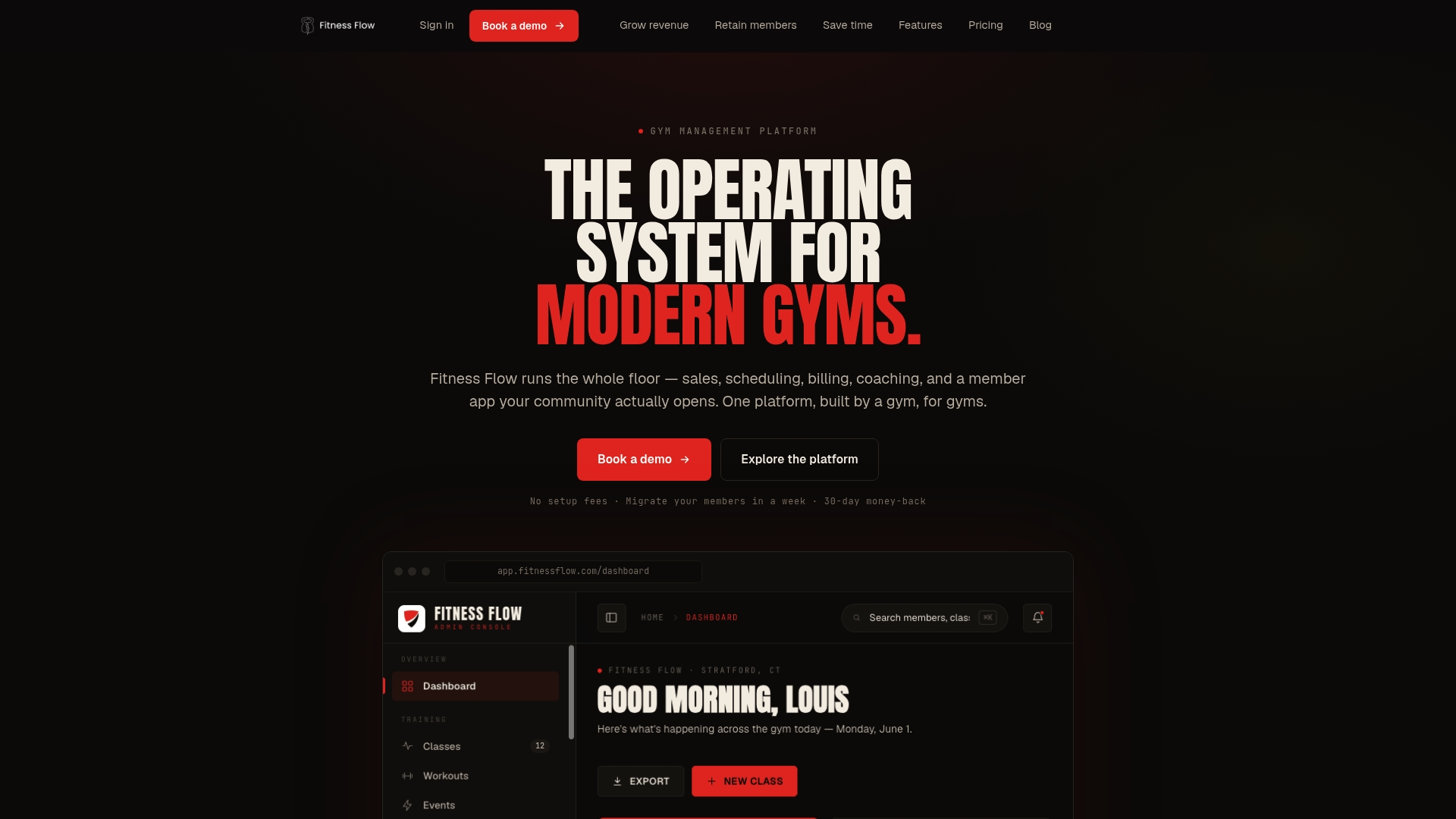
If you’re evaluating platforms or specifying this feature internally, run your actual freeze policy against a live demo, backdated requests, open-ended freezes, overlapping edge cases included, and see whether the billing output matches what your finance team expects. You can also review broader platform capabilities on the Fitness Flow blog before booking time with the team. If your intake process still runs through a third-party form, a partner like Brainiac Media can help redesign the member-facing side to match. Book a walkthrough and bring your hardest test case.
Sources
- How Membership Freezes Should Work | Talk Think Do
- Automate Gym Freeze Requests: 8-Step Workflow Guide | US Tech Automations
FAQ
What Is A Membership Freeze In Gym Software?
It’s a date-bounded record capturing when a member’s access and billing pause, with billing status and access rules computed from those dates rather than a manually set flag.
Should A Freeze Replace Or Suspend The Regular Membership Fee?
For any billing date inside the freeze window, the system should replace the recurring fee with the configured freeze fee, not simply skip the charge entirely.
How Long Does Manual Freeze Processing Take Compared To Automated Systems?
Manual processing typically takes 10 to 20 minutes per request, while automated workflows complete the same lifecycle in under two minutes.
Can A Membership Freeze Be Open-Ended?
Yes. The end date should be nullable to represent a genuinely open-ended freeze, with reactivation triggered manually or by a later edit to the record.
Does Joinfitnessflow Support Per-Package Freeze Fees?
Yes. Joinfitnessflow’s Membership accelerator configures freeze fees per package and per site, and locks in each member’s agreed fee at signup so later price changes don’t affect it.